
![[Selenium Java] Bài 31: Cài đặt và sử dụng Extent Report Allure Report](/uploads/banner/blog-category/selenium-java/selenium-java-bai-31.jpg)
Nội dung bài học
Nếu bạn chưa biết mô hình đối tượng trang (Page Object) thì trước khi bắt đầu bài viết này mình khuyên bạn nên xem lại bài viết mô hình POM trong Selenium Java của An. Tại vì những ví dụ sẽ chạy test case hoàn chỉnh nên An chạy code theo dạng page object cho nhanh á.
Nội dung chính:
1. Cài đặt Extent Report trong Selenium Java
Bây giờ, mình sẽ thêm gói Extent Report và trình lắng nghe Listeners trong pom.xml như được hiển thị bên dưới.
Cấu trúc source tổng quát như này
![[Selenium Java] Bài 31: Cài đặt và sử dụng Extent Report Allure Report | Anh Tester](/uploads/lesson/selenium_java/reports/cau_truc_source-min.jpg)
Bước 1: Thêm thư viện Extent Reports vào pom.xml trong Maven Project
<!-- https://mvnrepository.com/artifact/com.aventstack/extentreports -->
<dependency>
	<groupId>com.aventstack</groupId>
	<artifactId>extentreports</artifactId>
	<version>5.0.9</version>
</dependency>
Hoặc vào link này để download bản tùy ý:
https://mvnrepository.com/artifact/com.aventstack/extentreports
Bước 2: Thêm Extent Reports class
An đã tạo package "extentreports" trong package "utils" và thêm hai class bên dưới vào package đó. (ảnh minh họa trên cùng)
+ ExtentManager Class:
import com.aventstack.extentreports.ExtentReports;
import com.aventstack.extentreports.reporter.ExtentSparkReporter;

public class ExtentManager {

    private static final ExtentReports extentReports = new ExtentReports();

    public synchronized static ExtentReports getExtentReports() {
        ExtentSparkReporter reporter = new ExtentSparkReporter("./ExtentReports/ExtentReport.html");
        reporter.config().setReportName("Demo Extent Report");
        extentReports.attachReporter(reporter);
        extentReports.setSystemInfo("Framework Name", "Selenium Java Framework | Anh Tester");
        extentReports.setSystemInfo("Author", "Anh Tester");
        return extentReports;
    }
}
Cái "./ExtentReports/ExtentReport.html" là đường dẫn xuất ra file html của report. Folder "ExtentReports" sẽ nằm ngoài cùng ngang cấp src.
+ ExtentTestManager Class:
import anhtester.com.browsers.BaseSetup;
import com.aventstack.extentreports.ExtentReports;
import com.aventstack.extentreports.ExtentTest;
import com.aventstack.extentreports.Status;
import org.openqa.selenium.OutputType;
import org.openqa.selenium.TakesScreenshot;
import org.openqa.selenium.WebDriver;

import java.util.HashMap;
import java.util.Map;

public class ExtentTestManager {
    static Map<Integer, ExtentTest> extentTestMap = new HashMap<>();
    static ExtentReports extent = ExtentManager.getExtentReports();

    public static ExtentTest getTest() {
        return extentTestMap.get((int) Thread.currentThread().getId());
    }

    public static synchronized ExtentTest saveToReport(String testName, String desc) {
        ExtentTest test = extent.createTest(testName, desc);
        extentTestMap.put((int) Thread.currentThread().getId(), test);
        return test;
    }

    public WebDriver getDriver() {
        WebDriver driver = BaseSetup.getDriver();
        return driver;
    }

    public static void addScreenShot(String message) {
        String base64Image = "data:image/png;base64,"
                + ((TakesScreenshot) BaseSetup.getDriver()).getScreenshotAs(OutputType.BASE64);
        getTest().log(Status.INFO, message,        MediaEntityBuilder.createScreenCaptureFromBase64String(base64Image).build());
    }

    public static void addScreenShot(Status status, String message) {

        String base64Image = "data:image/png;base64,"
                + ((TakesScreenshot) BaseSetup.getDriver()).getScreenshotAs(OutputType.BASE64);
        getTest().log(status, message,               MediaEntityBuilder.createScreenCaptureFromBase64String(base64Image).build());
    }

    public static void logMessage(String message) {
        getTest().log(Status.INFO, message);
    }

    public static void logMessage(Status status, String message) {
        getTest().log(status, message);
    }

}
- extentTestMap lưu giữ thông tin của id luồng và các cá thể ExtentTest.
- Phiên bản ExtentReports được tạo bằng cách gọi phương thức createExtentReports () từ ExtentManager.
- Tại phương thức saveToReport(), một phiên bản của ExtentTest đã được tạo và đưa vào extentTestMap với id luồng hiện tại.
- Tại phương thức getTest(), trả về cá thể ExtentTest trong scopeTestMap bằng cách sử dụng id luồng hiện tại.
Bước 3: Add Listener class
Chổ này bài trước mình học là tạo TestListener rồi đúng không. Nay mình tạo thêm cái mới là "ReportListener" để cho dễ tùy chọn. (hình minh họa trên cùng)
import anhtester.com.browsers.BaseSetup;
import anhtester.com.utils.extentreports.ExtentTestManager;
import anhtester.com.utils.helpers.CaptureHelpers;
import anhtester.com.utils.logs.Log;
import com.aventstack.extentreports.Status;
import org.openqa.selenium.WebDriver;
import org.testng.ITestContext;
import org.testng.ITestListener;
import org.testng.ITestResult;

import static anhtester.com.utils.extentreports.ExtentManager.getExtentReports;

public class ReportListener implements ITestListener {

    WebDriver driver;

    public String getTestName(ITestResult result) {
        return result.getTestName() != null ? result.getTestName()
                : result.getMethod().getConstructorOrMethod().getName();
    }

    public String getTestDescription(ITestResult result) {
        return result.getMethod().getDescription() != null ? result.getMethod().getDescription() : getTestName(result);
    }

    @Override
    public void onStart(ITestContext iTestContext) {
        driver = BaseSetup.getDriver();
        Log.info("Start testing " + iTestContext.getName());
        iTestContext.setAttribute("WebDriver", driver);
        //Gọi hàm startRecord video trong CaptureHelpers class
        try {
            CaptureHelpers.startRecord(iTestContext.getName());
        } catch (Exception e) {
            e.printStackTrace();
        }
    }

    @Override
    public void onFinish(ITestContext iTestContext) {
        Log.info("End testing " + iTestContext.getName());
        //Kết thúc và thực thi Extents Report
        getExtentReports().flush();
        //Gọi hàm stopRecord video trong CaptureHelpers class
        CaptureHelpers.stopRecord();
    }

    @Override
    public void onTestStart(ITestResult iTestResult) {
        Log.info(getTestName(iTestResult) + " test is starting...");
        ExtentTestManager.saveToReport(iTestResult.getName(), iTestResult.getTestName());
    }

    @Override
    public void onTestSuccess(ITestResult iTestResult) {
        Log.info(getTestName(iTestResult) + " test is passed.");
        //ExtentReports log operation for passed tests.
        ExtentTestManager.logMessage(Status.PASS, getTestDescription(iTestResult));
    }

    @Override
    public void onTestFailure(ITestResult iTestResult) {
        Log.error(getTestName(iTestResult) + " test is failed.");

        ExtentTestManager.addScreenShot(Status.FAIL, getTestName(iTestResult));

        ExtentTestManager.logMessage(Status.FAIL, iTestResult.getThrowable().toString());
        ExtentTestManager.logMessage(Status.FAIL, iTestResult.getName() + " is failed.");
    }

    @Override
    public void onTestSkipped(ITestResult iTestResult) {
        Log.warn(getTestName(iTestResult) + " test is skipped.");
        ExtentTestManager.logMessage(Status.SKIP, getTestName(iTestResult) + " test is skipped.");
    }

    @Override
    public void onTestFailedButWithinSuccessPercentage(ITestResult iTestResult) {
        Log.error("Test failed but it is in defined success ratio " + getTestName(iTestResult));
        ExtentTestManager.logMessage("Test failed but it is in defined success ratio " + getTestName(iTestResult));
    }
}
Chổ CaptureHelpers có gọi cái Record video nếu bạn chưa có thì xem lại bài trước hoặc bỏ nó luôn cũng được nhen.
Còn cái Log class thì mình đã thêm hôm trước trong bài ghi Log rồi nên dùng lại thôi nhen.
import org.apache.logging.log4j.LogManager;
import org.apache.logging.log4j.Logger;

public class Log {
    //Initialize Log4j instance
    private static final Logger Log =  LogManager.getLogger(Log.class);

    //Info Level Logs
    public static void info (String message) {
        Log.info(message);
    }

    //Warn Level Logs
    public static void warn (String message) {
        Log.warn(message);
    }

    //Error Level Logs
    public static void error (String message) {
        Log.error(message);
    }

    //Fatal Level Logs
    public static void fatal (String message) {
        Log.fatal(message);
    }

    //Debug Level Logs
    public static void debug (String message) {
        Log.debug(message);
    }
}
Bước 4: Gọi ReportListener class vào test case
Chổ này thì mình có thể gọi 2 cấp độ class hoặc suite tùy ý như bài hôm trước về Listener An đã nói rồi á. Có quên thì xem lại phát biết ngay nè.
Gọi trong Class:
![[Selenium Java] Bài 31: Cài đặt và sử dụng Extent Report Allure Report | Anh Tester](/uploads/lesson/selenium_java/reports/goi_reportlistener-min.jpg)
Gọi trong Suite file XML:
![[Selenium Java] Bài 31: Cài đặt và sử dụng Extent Report Allure Report | Anh Tester](/uploads/lesson/selenium_java/reports/goi_reportlistener_suite-min.jpg)
An thiết lặp cả class Test case như này. Các bạn theo dõi các bài trước là hiểu ngay. Từ bài Page Object á.
import anhtester.com.projects.crm.pages.DashboardPage;
import anhtester.com.projects.crm.pages.SignInPage;
import anhtester.com.utils.listeners.ReportListener;
import anhtester.com.utils.helpers.WebUI;
import anhtester.com.projects.crm.pages.AddProjectPage;
import anhtester.com.projects.crm.pages.ProjectPage;

import anhtester.com.browsers.BaseSetup;
import org.openqa.selenium.WebDriver;
import org.testng.annotations.*;

@Listeners(ReportListener.class)
public class ProjectTest {

    private WebDriver driver;
    private SignInPage signInPage;
    private DashboardPage dashboardPage;
    private ProjectPage projectPage;
    private AddProjectPage addProjectPage;
    private WebUI webUI;

    @BeforeClass
    public void setupBrowser() {
        //driver = getDriver();  //extends BaseSetup
        driver = new BaseSetup().setupDriver("chrome");
        webUI = new WebUI(driver);
    }

    @Test(priority = 1, description = "Sign in page to CRM system")
    public void signInPage(){

        signInPage = new SignInPage(driver);
        driver.get("https://crm.anhtester.com");

        dashboardPage = signInPage.signIn("tld01@mailinator.com", "123456");
        webUI.waitForPageLoaded();
    }

    @Test(priority = 2, description = "Click Project menu to open Project page")
    public void openProjectPage() {

        webUI.waitForPageLoaded();
        projectPage = dashboardPage.openProjectsPage();
    }

    @Test(priority = 3)
    public void openAddProjectPage(){
        webUI.waitForPageLoaded();
        addProjectPage = projectPage.addProject();
    }

    @Test(priority = 4)
    public void addProject() throws InterruptedException {
        // Kiểm tra Text tồn tại trên trang
        // Hoặc đã dùng verifyElementText để kiểm tra trong hàm saveProduct
        // webUI.verifyPageLoaded("Add project");
        addProjectPage.saveProduct();
    }

    @Test(priority = 5, description = "Tìm kiếm Project sau khi Add")
    public void searchProject() throws InterruptedException {
        webUI.waitForPageLoaded();
        projectPage.enterSearchValue("PD2012");
        Thread.sleep(2000);
        projectPage.checkSearchTableByColumn(2, "PD2013"); //Fail
    }

    @AfterClass
    public void closeBrowser() {
        driver.close();
    }

}
Yeah vậy xong rồi đó. Chạy test case thôi nào.
Report sẽ xuất ra tại thư mục đường dẫn như mình chỉ định trên: "./ExtentReports/ExtentReport.html"
![[Selenium Java] Bài 31: Cài đặt và sử dụng Extent Report Allure Report | Anh Tester](/uploads/lesson/selenium_java/reports/file_report_html-min.jpg)
Chúng ta mở file report html lên bằng cách click chuột phải chọn Open In -> Browser -> "Chrome hoặc Edge...tùy ý"
![[Selenium Java] Bài 31: Cài đặt và sử dụng Extent Report Allure Report | Anh Tester](/uploads/lesson/selenium_java/reports/open_report_file-min.jpg)
Report dạng Step kèm description nếu chúng ta có điền thuộc dính description vào @Test. Không có thì nso sẽ để trống. Bạn có thể custom nó ở class "ReportListener" á.![[Selenium Java] Bài 31: Cài đặt và sử dụng Extent Report Allure Report | Anh Tester](/uploads/lesson/selenium_java/reports/report_step_description-min.jpg)
Và như trong ReportListener thì mình setup là test case nào Fail sẽ có Screenshot đi kèm á. Các bạn click chọn "base64 img" màu tím tím á nó sẽ hiểm thị ngay.
Report dạng Chart khi click chọn option chart icon thứ 2 á.
![[Selenium Java] Bài 31: Cài đặt và sử dụng Extent Report Allure Report | Anh Tester](/uploads/lesson/selenium_java/reports/report_chart-min.jpg)
Song song nó cũng ghi Log vào file cho mình luôn
![[Selenium Java] Bài 31: Cài đặt và sử dụng Extent Report Allure Report | Anh Tester](/uploads/lesson/selenium_java/reports/ghi_log-min.jpg)
Hết rồi !!!
2. Cài đặt Allure Report trong Selenium Java
Trước tiên, mình sẽ thêm biến môi trường Allure-2.27.0 vào máy tính của mình cũng giống như cài đặt biến môi trường cho Java JDK và Maven.
Mình đặt tên biến môi trường là ALLURE_HOME
Tải gói Allure-2.27.0 cho Window tại đây (cứ tải bản mới nhất nhé)
Vì An chỉ dạy trên môi trường máy window nên có gì các bạn kiếm bản cho MacOS hoặc Linux như hình hướng dẫn bên dưới:
Link download theo phiên bản: https://github.com/allure-framework/allure2/releases
Tiếp theo thì các bạn giải nén ra để nó vào ổ C (ổ chứa hệ điều hành) để tạo biến môi trường trong máy ổn định.
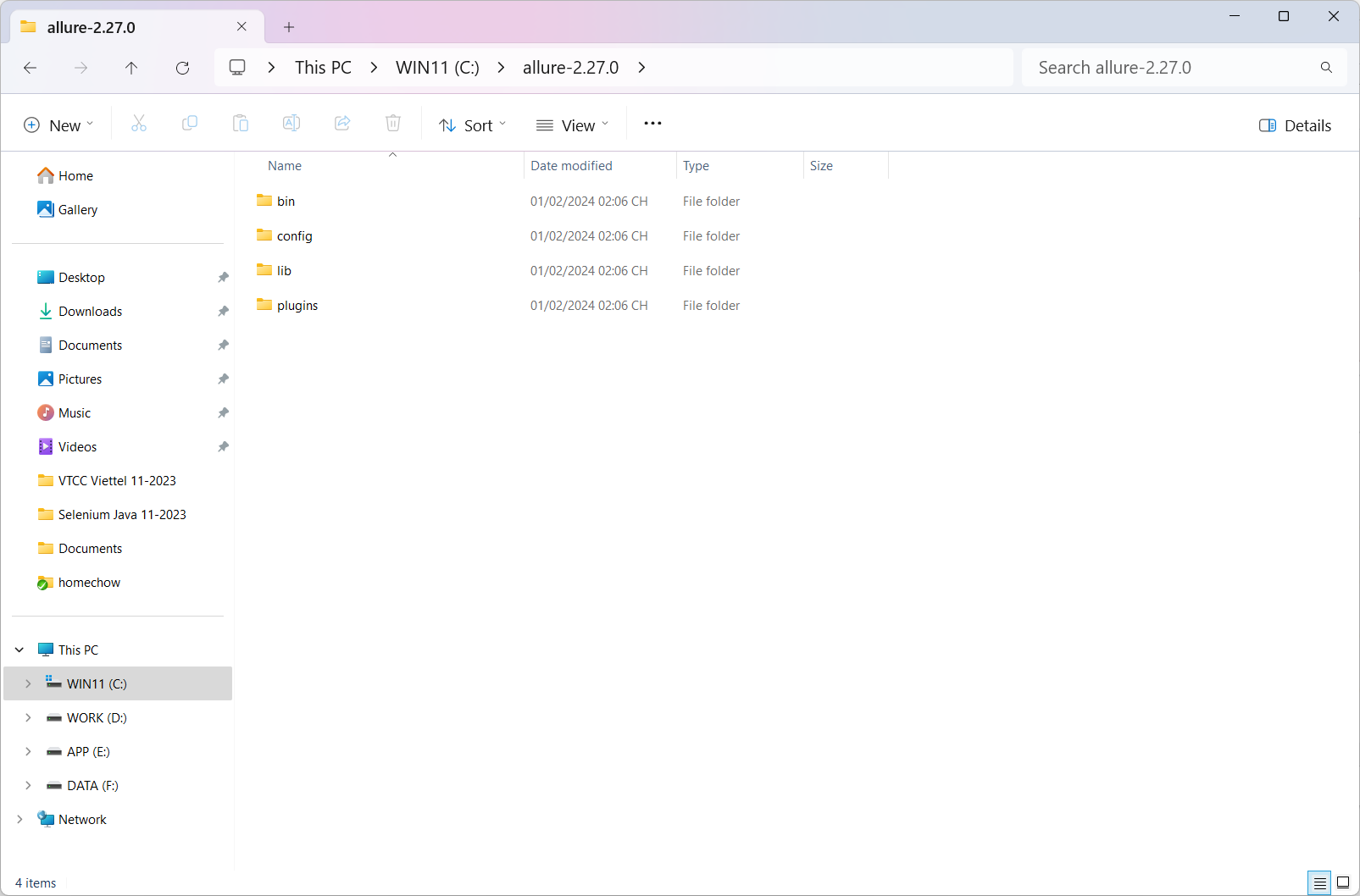
Tạo biến môi trường giống với setup biến môi trường Java JDK á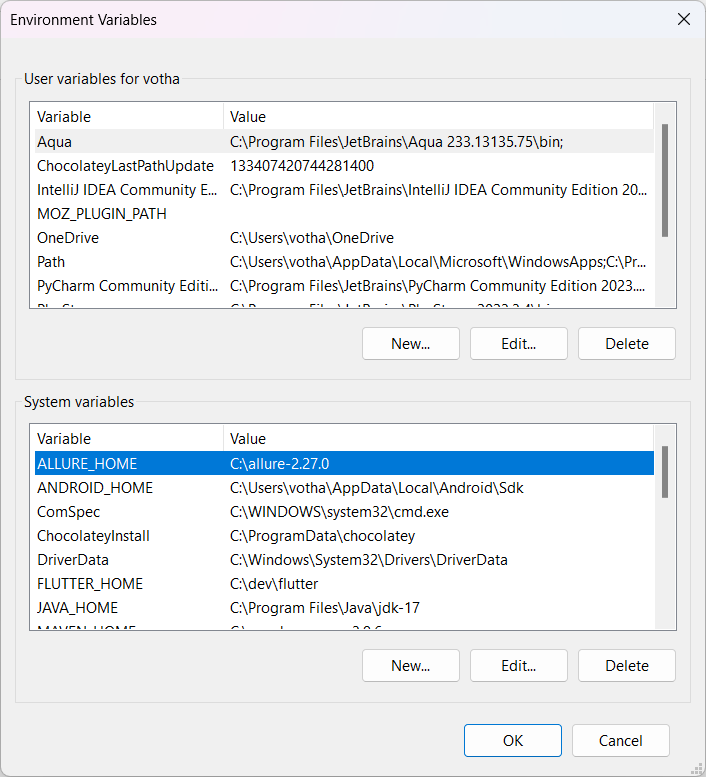
Edit biến path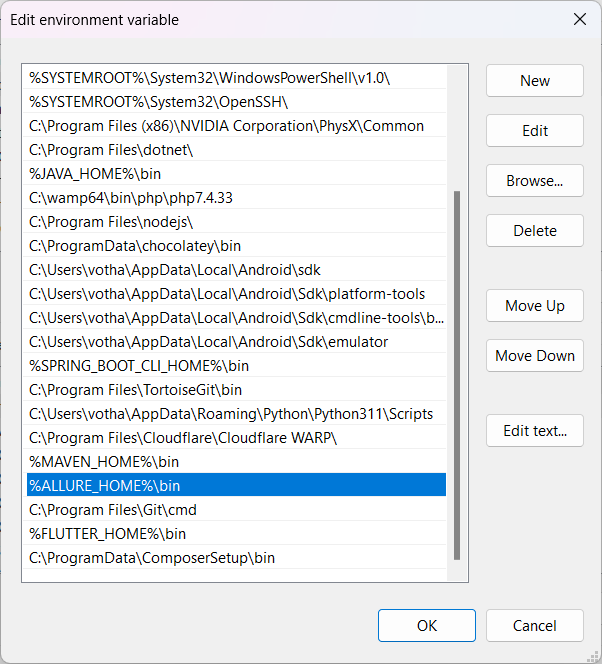
Chạy lệnh trong CMD để kiểm tra
allure --version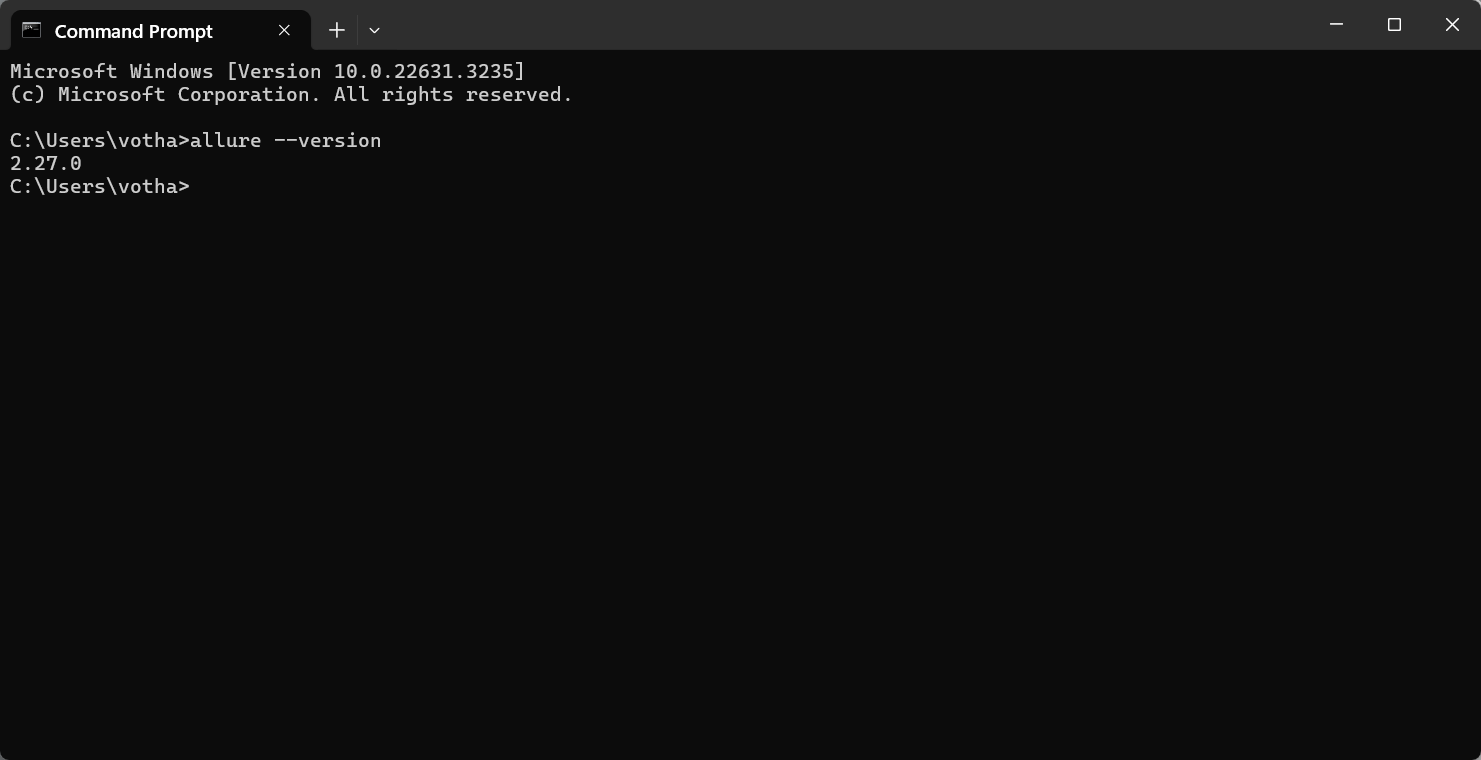
Tiếp theo là cấu hình Allure Report nào !!
Bước 1: Thêm thư viện Allure Reports vào pom.xml trong Maven Project
<!-- https://mvnrepository.com/artifact/io.qameta.allure/allure-testng -->
<dependency>
    <groupId>io.qameta.allure</groupId>
    <artifactId>allure-testng</artifactId>
    <version>2.19.0</version>
</dependency>
(Cập nhật ngày 27/09/2022)
Hoặc vào link này để download bản tùy ý:
https://mvnrepository.com/artifact/io.qameta.allure/allure-testng
Đây là tất cả các thư viện An đã add vào pom.xml của cả project đây:
<?xml version="1.0" encoding="UTF-8"?>
<project xmlns="http://maven.apache.org/POM/4.0.0"
         xmlns:xsi="http://www.w3.org/2001/XMLSchema-instance"
         xsi:schemaLocation="http://maven.apache.org/POM/4.0.0 http://maven.apache.org/xsd/maven-4.0.0.xsd">
    <modelVersion>4.0.0</modelVersion>

    <groupId>com.anhtester</groupId>
    <artifactId>ProjectWithMaven</artifactId>
    <version>1.0-SNAPSHOT</version>

    <properties>
        <maven.compiler.source>15</maven.compiler.source>
        <maven.compiler.target>15</maven.compiler.target>
    </properties>

    <dependencies>
        <!-- https://mvnrepository.com/artifact/org.seleniumhq.selenium/selenium-java -->
        <dependency>
            <groupId>org.seleniumhq.selenium</groupId>
            <artifactId>selenium-java</artifactId>
            <version>3.141.59</version>
        </dependency>

        <!-- https://mvnrepository.com/artifact/org.testng/testng -->
        <dependency>
            <groupId>org.testng</groupId>
            <artifactId>testng</artifactId>
            <version>7.4.0</version>
            <scope>test</scope>
        </dependency>

        <!-- https://mvnrepository.com/artifact/io.github.bonigarcia/webdrivermanager -->
        <dependency>
            <groupId>io.github.bonigarcia</groupId>
            <artifactId>webdrivermanager</artifactId>
            <version>5.3.0</version>
        </dependency>

        <!-- https://mvnrepository.com/artifact/org.slf4j/slf4j-simple -->
        <dependency>
            <groupId>org.slf4j</groupId>
            <artifactId>slf4j-simple</artifactId>
            <version>1.7.31</version>
            <scope>test</scope>
        </dependency>

        <!-- https://mvnrepository.com/artifact/org.apache.poi/poi -->
        <dependency>
            <groupId>org.apache.poi</groupId>
            <artifactId>poi</artifactId>
            <version>5.0.0</version>
        </dependency>

        <!-- https://mvnrepository.com/artifact/org.apache.poi/poi-ooxml -->
        <dependency>
            <groupId>org.apache.poi</groupId>
            <artifactId>poi-ooxml</artifactId>
            <version>5.0.0</version>
        </dependency>
        <dependency>
            <groupId>org.testng</groupId>
            <artifactId>testng</artifactId>
            <version>7.4.0</version>
            <scope>compile</scope>
        </dependency>

        <!-- https://mvnrepository.com/artifact/com.github.stephenc.monte/monte-screen-recorder -->
        <dependency>
            <groupId>com.github.stephenc.monte</groupId>
            <artifactId>monte-screen-recorder</artifactId>
            <version>0.7.7.0</version>
        </dependency>

        <!-- https://mvnrepository.com/artifact/org.apache.logging.log4j/log4j-core -->
        <dependency>
            <groupId>org.apache.logging.log4j</groupId>
            <artifactId>log4j-core</artifactId>
            <version>2.19.0</version>
        </dependency>
        <!-- https://mvnrepository.com/artifact/org.apache.logging.log4j/log4j-api -->
        <dependency>
            <groupId>org.apache.logging.log4j</groupId>
            <artifactId>log4j-api</artifactId>
            <version>2.19.0</version>
        </dependency>

        <!-- https://mvnrepository.com/artifact/com.aventstack/extentreports -->
        <dependency>
            <groupId>com.aventstack</groupId>
            <artifactId>extentreports</artifactId>
            <version>5.0.9</version>
        </dependency>

        <!-- https://mvnrepository.com/artifact/io.qameta.allure/allure-testng -->
        <dependency>
            <groupId>io.qameta.allure</groupId>
            <artifactId>allure-testng</artifactId>
            <version>2.19.0</version>
        </dependency>

    </dependencies>

</project>
Bước 2: Thêm tùy chỉnh Allure Reports vào ReportListener class
package anhtester.com.utils.listeners;

import anhtester.com.browsers.BaseSetup;
import anhtester.com.utils.extentreports.ExtentTestManager;
import anhtester.com.utils.helpers.CaptureHelpers;
import anhtester.com.utils.logs.Log;
import com.aventstack.extentreports.Status;
import io.qameta.allure.Attachment;
import org.openqa.selenium.OutputType;
import org.openqa.selenium.TakesScreenshot;
import org.openqa.selenium.WebDriver;
import org.testng.ITestContext;
import org.testng.ITestListener;
import org.testng.ITestResult;

import static anhtester.com.utils.extentreports.ExtentManager.getExtentReports;

public class ReportListener implements ITestListener {

    WebDriver driver;

    public String getTestName(ITestResult result) {
        return result.getTestName() != null ? result.getTestName()
                : result.getMethod().getConstructorOrMethod().getName();
    }

    public String getTestDescription(ITestResult result) {
        return result.getMethod().getDescription() != null ? result.getMethod().getDescription() : getTestName(result);
    }

    //Text attachments for Allure
    @Attachment(value = "{0}", type = "text/plain")
    public static String saveTextLog(String message) {
        return message;
    }

    //HTML attachments for Allure
    @Attachment(value = "{0}", type = "text/html")
    public static String attachHtml(String html) {
        return html;
    }

    //Text attachments for Allure
    @Attachment(value = "Page screenshot", type = "image/png")
    public byte[] saveScreenshotPNG(WebDriver driver) {
        return ((TakesScreenshot) driver).getScreenshotAs(OutputType.BYTES);
    }

    @Override
    public void onStart(ITestContext iTestContext) {
        driver = BaseSetup.getDriver();
        Log.info("Start testing " + iTestContext.getName());
        iTestContext.setAttribute("WebDriver", driver);
        //Gọi hàm startRecord video trong CaptureHelpers class
        try {
            CaptureHelpers.startRecord(iTestContext.getName());
        } catch (Exception e) {
            e.printStackTrace();
        }
    }

    @Override
    public void onFinish(ITestContext iTestContext) {
        Log.info("End testing " + iTestContext.getName());
        //Kết thúc và thực thi Extents Report
        getExtentReports().flush();
        //Gọi hàm stopRecord video trong CaptureHelpers class
        CaptureHelpers.stopRecord();
    }

    @Override
    public void onTestStart(ITestResult iTestResult) {
        Log.info(getTestName(iTestResult) + " test is starting...");
        ExtentTestManager.saveToReport(iTestResult.getName(), iTestResult.getTestName());
    }

    @Override
    public void onTestSuccess(ITestResult iTestResult) {
        Log.info(getTestName(iTestResult) + " test is passed.");
        //ExtentReports log operation for passed tests.
        ExtentTestManager.logMessage(Status.PASS, getTestDescription(iTestResult));
    }

    @Override
    public void onTestFailure(ITestResult iTestResult) {
        driver = BaseSetup.getDriver();

        Log.error(getTestName(iTestResult) + " test is failed.");

        ExtentTestManager.addScreenShot(Status.FAIL, getTestName(iTestResult));

        ExtentTestManager.logMessage(Status.FAIL, iTestResult.getThrowable().toString());
        ExtentTestManager.logMessage(Status.FAIL, iTestResult.getName() + " is failed.");

        //Allure Screenshot custom
        Log.error("Screenshot captured for test case: " + getTestName(iTestResult));
        saveScreenshotPNG(driver);
        //Save a log on Allure report.
        saveTextLog(getTestName(iTestResult) + " failed and screenshot taken!");
    }

    @Override
    public void onTestSkipped(ITestResult iTestResult) {
        Log.warn(getTestName(iTestResult) + " test is skipped.");
        ExtentTestManager.logMessage(Status.SKIP, getTestName(iTestResult) + " test is skipped.");
    }

    @Override
    public void onTestFailedButWithinSuccessPercentage(ITestResult iTestResult) {
        Log.error("Test failed but it is in defined success ratio " + getTestName(iTestResult));
        ExtentTestManager.logMessage("Test failed but it is in defined success ratio " + getTestName(iTestResult));
    }
}
Bước 3: Thêm ghi chú của thư viện Allure vào test case class
package anhtester.com.utils.listeners;

import anhtester.com.browsers.BaseSetup;
import anhtester.com.utils.extentreports.ExtentTestManager;
import anhtester.com.utils.helpers.CaptureHelpers;
import anhtester.com.utils.logs.Log;
import com.aventstack.extentreports.Status;
import io.qameta.allure.Attachment;
import org.openqa.selenium.OutputType;
import org.openqa.selenium.TakesScreenshot;
import org.openqa.selenium.WebDriver;
import org.testng.ITestContext;
import org.testng.ITestListener;
import org.testng.ITestResult;

import static anhtester.com.utils.extentreports.ExtentManager.getExtentReports;

public class ReportListener implements ITestListener {

    WebDriver driver;

    public String getTestName(ITestResult result) {
        return result.getTestName() != null ? result.getTestName()
                : result.getMethod().getConstructorOrMethod().getName();
    }

    public String getTestDescription(ITestResult result) {
        return result.getMethod().getDescription() != null ? result.getMethod().getDescription() : getTestName(result);
    }

    //Text attachments for Allure
    @Attachment(value = "{0}", type = "text/plain")
    public static String saveTextLog(String message) {
        return message;
    }

    //HTML attachments for Allure
    @Attachment(value = "{0}", type = "text/html")
    public static String attachHtml(String html) {
        return html;
    }

    //Text attachments for Allure
    @Attachment(value = "Page screenshot", type = "image/png")
    public byte[] saveScreenshotPNG(WebDriver driver) {
        return ((TakesScreenshot) driver).getScreenshotAs(OutputType.BYTES);
    }

    @Override
    public void onStart(ITestContext iTestContext) {
        driver = BaseSetup.getDriver();
        Log.info("Start testing " + iTestContext.getName());
        iTestContext.setAttribute("WebDriver", driver);
        //Gọi hàm startRecord video trong CaptureHelpers class
        try {
            CaptureHelpers.startRecord(iTestContext.getName());
        } catch (Exception e) {
            e.printStackTrace();
        }
    }

    @Override
    public void onFinish(ITestContext iTestContext) {
        Log.info("End testing " + iTestContext.getName());
        //Kết thúc và thực thi Extents Report
        getExtentReports().flush();
        //Gọi hàm stopRecord video trong CaptureHelpers class
        CaptureHelpers.stopRecord();
    }

    @Override
    public void onTestStart(ITestResult iTestResult) {
        Log.info(getTestName(iTestResult) + " test is starting...");
        ExtentTestManager.saveToReport(iTestResult.getName(), iTestResult.getTestName());
    }

    @Override
    public void onTestSuccess(ITestResult iTestResult) {
        Log.info(getTestName(iTestResult) + " test is passed.");
        //ExtentReports log operation for passed tests.
        ExtentTestManager.logMessage(Status.PASS, getTestDescription(iTestResult));
    }

    @Override
    public void onTestFailure(ITestResult iTestResult) {
        driver = BaseSetup.getDriver();

        Log.error(getTestName(iTestResult) + " test is failed.");

        ExtentTestManager.addScreenShot(Status.FAIL, getTestName(iTestResult));
        ExtentTestManager.logMessage(Status.FAIL, getTestDescription(iTestResult));

        //Allure Screenshot custom
        Log.error("Screenshot captured for test case: " + getTestName(iTestResult));
        saveScreenshotPNG(driver);
        //Save a log on Allure report.
        saveTextLog(getTestName(iTestResult) + " failed and screenshot taken!");
    }

    @Override
    public void onTestSkipped(ITestResult iTestResult) {
        Log.warn(getTestName(iTestResult) + " test is skipped.");
        ExtentTestManager.logMessage(Status.SKIP, getTestName(iTestResult) + " test is skipped.");
    }

    @Override
    public void onTestFailedButWithinSuccessPercentage(ITestResult iTestResult) {
        Log.error("Test failed but it is in defined success ratio " + getTestName(iTestResult));
        ExtentTestManager.logMessage("Test failed but it is in defined success ratio " + getTestName(iTestResult));
    }
}
Các ghi chú trong Allure Report:
@Epic
@Features
@Stories/@Story
@Severity(SeverityLevel.BLOCKER)
@Description("In this cool test we will check cool thing")
@Step
@Attachment
@Link
Cái ghi chú quan trọng của mình là @Step. Nó đại diện cho từng @Test. Còn cái Ghi chú còn lại thì bổ trợ làm rõ ràng hơn cho Suite test case.
Các bạn nghiên cứu thêm tại đây: https://docs.qameta.io/allure-report/frameworks/java/testng#features
Mô tả chi tiết hơn tại đây: https://www.seleniumeasy.com/selenium-tutorials/allure-report-example-with-annotations
Demo: https://demo.qameta.io/allure/#behaviors
Bước 4: Mở Allure Reports
Sau khi chạy test case các bạn thấy là nó sẽ tự sinh ra cho mình folder "allure-results" nó chứa các file json. Đó cũng là data của report.
Từ giao diện IntelliJ sau khi các bạn chạy test case trên xong thì mở "Terminal" lên để chạy lệnh.
![[Selenium Java] Bài 31: Cài đặt và sử dụng Extent Report Allure Report | Anh Tester](/uploads/lesson/selenium_java/reports/open_terminal_1-min.jpg)
Hoặc![[Selenium Java] Bài 31: Cài đặt và sử dụng Extent Report Allure Report | Anh Tester](/uploads/lesson/selenium_java/reports/open_terminal_2-min.jpg)
Hoặc dùng phím tắt Alt + F12
Tiếp theo là chạy lệnh trong Terminal: allure serve allure-results
![[Selenium Java] Bài 31: Cài đặt và sử dụng Extent Report Allure Report | Anh Tester](/uploads/lesson/selenium_java/reports/nhap_lenh_chay_open_allure-min.jpg)
![[Selenium Java] Bài 31: Cài đặt và sử dụng Extent Report Allure Report | Anh Tester](/uploads/lesson/selenium_java/reports/auto_generate_report_folder-min.jpg)
Đợi tầm 5s nó sinh ra cho mình 1 đường link tự động mở trên Browser luôn. Không thì các bạn click link trong vùng Terminal như hình trên cũng được.![[Selenium Java] Bài 31: Cài đặt và sử dụng Extent Report Allure Report | Anh Tester](/uploads/lesson/selenium_java/reports/dashboard_allure_report-min.jpg)
Giao diện từng Step![[Selenium Java] Bài 31: Cài đặt và sử dụng Extent Report Allure Report | Anh Tester](/uploads/lesson/selenium_java/reports/detail_step_allure_report-min.jpg)
Khi không cần xem nữa thì tắt Terminal đi với phím tắt Ctrl +C sau đó chọn Y và Enter
Đính kèm hình ảnh vào Allure Report khi Test case Fail
Các bạn chú ý: dùng bản TestNG 7.4.0 thì Allure report nó mới hiểu Attachment cái file hình vào khi test cases Fail
Thêm thư viện sau vào pom.xml: Allure Attachments, Aspectjweaver và Project Lombok
Chổ này Allure Report các bạn cập nhật lên phiên bản mới nhất là 2.19.0 (cập nhật ngày 27/09/2022)
        <!-- https://mvnrepository.com/artifact/io.qameta.allure/allure-testng -->
        <dependency>
            <groupId>io.qameta.allure</groupId>
            <artifactId>allure-testng</artifactId>
            <version>2.19.0</version>
        </dependency>

        <!-- https://mvnrepository.com/artifact/io.qameta.allure/allure-attachments -->
        <dependency>
            <groupId>io.qameta.allure</groupId>
            <artifactId>allure-attachments</artifactId>
            <version>2.19.0</version>
        </dependency>

        <!-- https://mvnrepository.com/artifact/org.aspectj/aspectjweaver -->
        <dependency>
            <groupId>org.aspectj</groupId>
            <artifactId>aspectjweaver</artifactId>
            <version>1.9.9.1</version>
        </dependency>
Tiếp theo là tạo thẻ build trong maven của file pom.xml như mẫu:
Chú ý: đặt ngoài thẻ dependencies
    <build>
        <pluginManagement>
            <plugins>
                <plugin>
                    <groupId>org.apache.maven.plugins</groupId>
                    <artifactId>maven-surefire-plugin</artifactId>
                    <version>3.0.0-M7</version>
                    <configuration>
                        <suiteXmlFiles>
                            <!-- Call Suite name global set up above -->
                            <suiteXmlFile>src/test/java/suites/RunTestcases.xml</suiteXmlFile>
                        </suiteXmlFiles>
                        <argLine>
                            -javaagent:"${settings.localRepository}/org/aspectj/aspectjweaver/1.9.9.1/aspectjweaver-1.9.9.1.jar"
                        </argLine>
                        <testFailureIgnore>true</testFailureIgnore>
                        <systemPropertyVariables>
                            <allure.results.directory>target/allure-results</allure.results.directory>
                        </systemPropertyVariables>
                    </configuration>
                </plugin>
            </plugins>
        </pluginManagement>
    </build>
File pom.xml full lúc này sẽ là:
<?xml version="1.0" encoding="UTF-8"?>
<project xmlns="http://maven.apache.org/POM/4.0.0"
         xmlns:xsi="http://www.w3.org/2001/XMLSchema-instance"
         xsi:schemaLocation="http://maven.apache.org/POM/4.0.0 http://maven.apache.org/xsd/maven-4.0.0.xsd">
    <modelVersion>4.0.0</modelVersion>

    <groupId>com.anhtester</groupId>
    <artifactId>ProjectWithMaven</artifactId>
    <version>1.0-SNAPSHOT</version>

    <properties>
        <maven.compiler.source>15</maven.compiler.source>
        <maven.compiler.target>15</maven.compiler.target>
    </properties>

    <dependencies>
        <!-- https://mvnrepository.com/artifact/org.seleniumhq.selenium/selenium-java -->
        <dependency>
            <groupId>org.seleniumhq.selenium</groupId>
            <artifactId>selenium-java</artifactId>
            <version>3.141.59</version>
        </dependency>

        <!-- https://mvnrepository.com/artifact/org.testng/testng -->
        <dependency>
            <groupId>org.testng</groupId>
            <artifactId>testng</artifactId>
            <version>7.4.0</version>
        </dependency>

        <!-- https://mvnrepository.com/artifact/io.github.bonigarcia/webdrivermanager -->
        <dependency>
            <groupId>io.github.bonigarcia</groupId>
            <artifactId>webdrivermanager</artifactId>
            <version>5.3.3</version>
        </dependency>

        <!-- https://mvnrepository.com/artifact/org.slf4j/slf4j-simple -->
        <dependency>
            <groupId>org.slf4j</groupId>
            <artifactId>slf4j-simple</artifactId>
            <version>1.7.36</version>
            <scope>test</scope>
        </dependency>

        <!-- https://mvnrepository.com/artifact/org.apache.poi/poi -->
        <dependency>
            <groupId>org.apache.poi</groupId>
            <artifactId>poi</artifactId>
            <version>5.0.0</version>
        </dependency>

        <!-- https://mvnrepository.com/artifact/org.apache.poi/poi-ooxml -->
        <dependency>
            <groupId>org.apache.poi</groupId>
            <artifactId>poi-ooxml</artifactId>
            <version>5.0.0</version>
        </dependency>

        <!-- https://mvnrepository.com/artifact/com.github.stephenc.monte/monte-screen-recorder -->
        <dependency>
            <groupId>com.github.stephenc.monte</groupId>
            <artifactId>monte-screen-recorder</artifactId>
            <version>0.7.7.0</version>
        </dependency>

        <!-- https://mvnrepository.com/artifact/org.apache.logging.log4j/log4j-core -->
        <dependency>
            <groupId>org.apache.logging.log4j</groupId>
            <artifactId>log4j-core</artifactId>
            <version>2.19.0</version>
        </dependency>

        <!-- https://mvnrepository.com/artifact/org.apache.logging.log4j/log4j-api -->
        <dependency>
            <groupId>org.apache.logging.log4j</groupId>
            <artifactId>log4j-api</artifactId>
            <version>2.19.0</version>
        </dependency>

        <!-- https://mvnrepository.com/artifact/com.aventstack/extentreports -->
        <dependency>
            <groupId>com.aventstack</groupId>
            <artifactId>extentreports</artifactId>
            <version>5.0.9</version>
        </dependency>

        <!-- https://mvnrepository.com/artifact/io.qameta.allure/allure-testng -->
        <dependency>
            <groupId>io.qameta.allure</groupId>
            <artifactId>allure-testng</artifactId>
            <version>2.19.0</version>
        </dependency>

        <!-- https://mvnrepository.com/artifact/io.qameta.allure/allure-attachments -->
        <dependency>
            <groupId>io.qameta.allure</groupId>
            <artifactId>allure-attachments</artifactId>
            <version>2.19.0</version>
        </dependency>

        <!-- https://mvnrepository.com/artifact/org.aspectj/aspectjweaver -->
        <dependency>
            <groupId>org.aspectj</groupId>
            <artifactId>aspectjweaver</artifactId>
            <version>1.9.9.1</version>
        </dependency>

    </dependencies>

    <build>
        <pluginManagement>
            <plugins>
                <plugin>
                    <groupId>org.apache.maven.plugins</groupId>
                    <artifactId>maven-surefire-plugin</artifactId>
                    <version>3.0.0-M7</version>
                    <configuration>
                        <suiteXmlFiles>
                            <!-- Call Suite name global set up above -->
                            <suiteXmlFile>src/test/java/suites/RunTestcases.xml</suiteXmlFile>
                        </suiteXmlFiles>
                        <argLine>
                            -javaagent:"${settings.localRepository}/org/aspectj/aspectjweaver/1.9.9.1/aspectjweaver-1.9.9.1.jar"
                        </argLine>
                        <testFailureIgnore>true</testFailureIgnore>
                        <systemPropertyVariables>
                            <allure.results.directory>target/allure-results</allure.results.directory>
                        </systemPropertyVariables>
                    </configuration>
                </plugin>
            </plugins>
        </pluginManagement>
    </build>

</project>
- Chổ <suiteXmlFile>src/test/java/suites/RunTestcases.xml</suiteXmlFile> chỉ đường dẫn đến file XML khi chạy trực tiếp từ pom.xml nếu chạy từ class hoặc file xml thì không cần đoạn đó cũng được.
- Chổ <allure.results.directory>target/allure-results</allure.results.directory> đoạn này chỉ đường dẫn xuất report. Nằm trong folder target. Nếu muốn mang ra ngoài thì sửa lại là allure-results thôi là xong.
Chạy lệnh trong Terminal: allure serve target/allure-results
![[Selenium Java] Bài 31: Cài đặt và sử dụng Extent Report Allure Report | Anh Tester](/uploads/lesson/selenium_java/reports/allure_report_attachment.jpg)
🔆 Add step detail vào từng bước của test cases thì các bạn cũng làm tương tự như Extent Report bên trên là gọi nó vào trong WebUI keyword
Ví dụ hàm openURL trong WebUI keyword (WebUI thì bạn có thể xem bên dưới source tham khảo)
    @Step("Open URL: {0}")
    public static void openURL(String url) {
        DriverManager.getDriver().get(url);
        sleep(STEP_TIME);
        Log.info("Open: " + url);
        ExtentTestManager.logMessage(Status.PASS, "Open URL: " + url);

        waitForPageLoaded();
        if (PropertiesHelpers.getValue("screenshot_step").equals("yes")) {
            CaptureHelpers.takeScreenshot("openURL_" + Helpers.makeSlug(url));
        }
    }
Mình thêm cái @Step là để gắn step detail vào report
Hoặc các bạn có thể thêm description hơn bằng cách gọi hàm saveTextLog dưới chổ logMessage như của Extent Report
    @Step("Open URL: {0}")
    public static void openURL(String url) {
        DriverManager.getDriver().get(url);
        sleep(STEP_TIME);
        Log.info("Open: " + url);
        ExtentTestManager.logMessage(Status.PASS, "Open URL: " + url);
        AllureManager.saveTextLog("Open URL: " + url);
        waitForPageLoaded();
        if (PropertiesHelpers.getValue("screenshot_step").equals("yes")) {
            CaptureHelpers.takeScreenshot("openURL_" + Helpers.makeSlug(url));
        }
    }
Cái AllureManager là cái hàm ghi log và screenshot từ trong TestListener lấy ra class riêng để gọi lại dùng cho tiện ở nhiều nơi.
package anhtester.com.reports;

import anhtester.com.driver.DriverManager;
import io.qameta.allure.Attachment;
import org.openqa.selenium.OutputType;
import org.openqa.selenium.TakesScreenshot;

public class AllureManager {

    //Text attachments for Allure
    @Attachment(value = "{0}", type = "text/plain")
    public static String saveTextLog(String message) {
        return message;
    }

    //HTML attachments for Allure
    @Attachment(value = "{0}", type = "text/html")
    public static String attachHtml(String html) {
        return html;
    }

    //Text attachments for Allure
    @Attachment(value = "Page screenshot", type = "image/png")
    public static byte[] saveScreenshotPNG() {
        return ((TakesScreenshot) DriverManager.getDriver()).getScreenshotAs(OutputType.BYTES);
    }

}
Sau khi chạy thì nó sẽ như này![[Selenium Java] Bài 33: Cài đặt và sử dụng Extent Report Allure Report | Anh Tester](/uploads/lesson/selenium_java/reports/allure_report_attachment_step_detail.jpg)
Chắc nhiều bạn cần mức độ như thế đúng không 😜
Source code tham khảo từ khoá học 04/2022: https://github.com/anhtester/SeleniumMaven42022Parallel
 Zalo
Zalo
Anh Tester
facebook.com/anhtester
Đường dẫu khó chân vẫn cần bước đi
Đời dẫu khổ tâm vẫn cần nghĩ thấu